On this page
From idea to delivery, in nine steps
For ideas that don't fit a template or a hand-built book: adjustments and rolls, multi-day logic, complete systems, or rules you already run elsewhere. Five stages: Submit your definition → Discuss in chat → Approval · deadline · quote → Payment → Delivery.
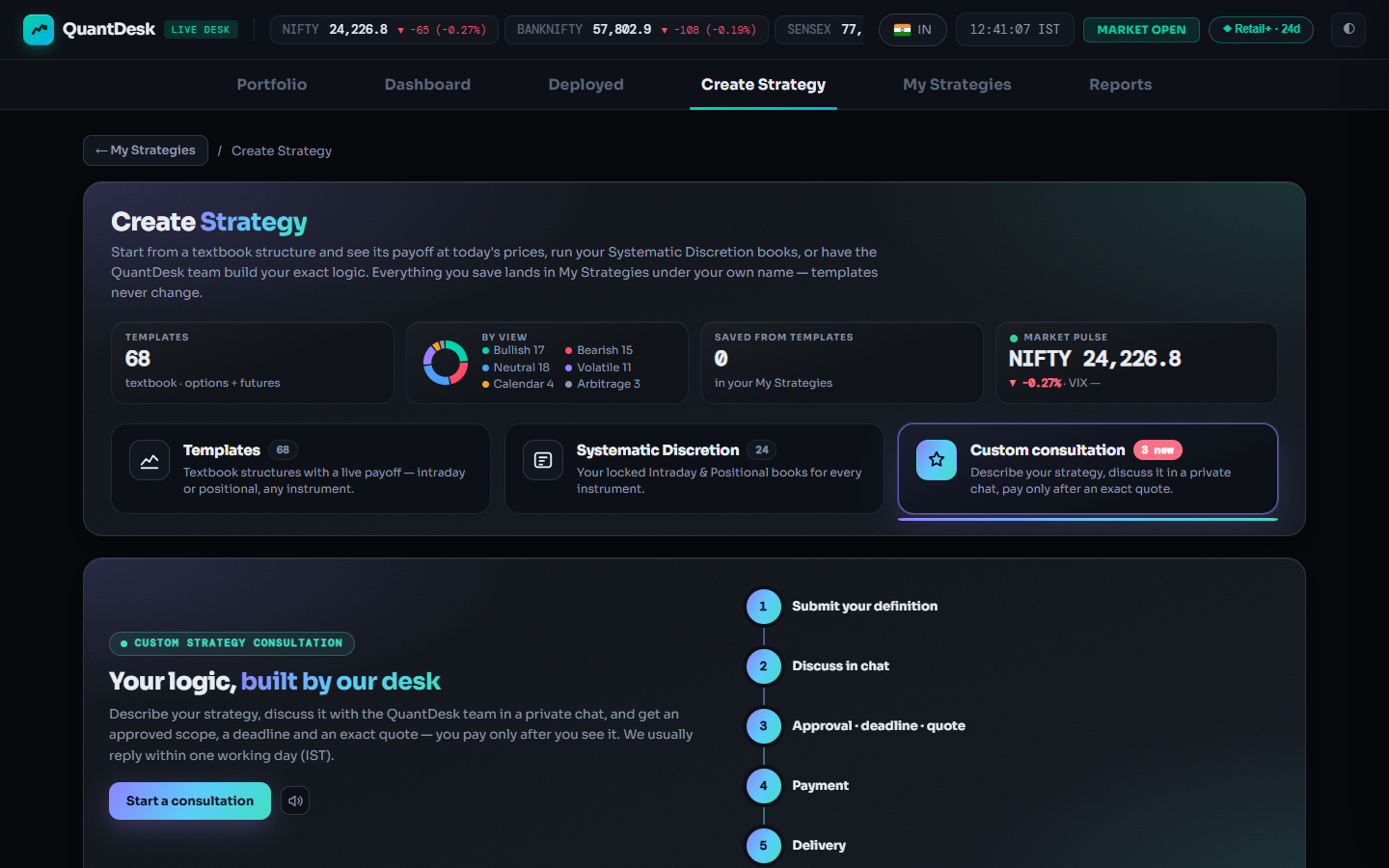
Open Custom consultation and start
The third category tile in Create Strategy (badge “approx. from ₹2,000”). The home screen has Start a consultation, your My consultations list with unread badges, level guides, notes and an FAQ.
Click Start a consultation
Give it a title
The New consultation form has four steps across the top: Definition, Instruments & style, Attachments, Review & submit. Continue and Back move between them.
Type the Title *
Write the definition
At least 20 characters. Follow the pattern in the box: entry (when and what: legs, strikes, lots), exit (stop-loss, target, time), then adjustments, re-entries and filters. Exact times and numbers save a round of questions.
Fill Strategy definition *, then Continue
Pick instruments and style
One or more instruments (required), Intraday or Positional, an optional Preferred level (leave “Not sure” if unsure) and an optional contact.
Attachments (optional)
Drop images or PDFs: PNG, JPEG, WEBP or PDF, up to 10 MB each, up to 5 files. A chart with your levels marked helps.
Review and submit
Tick “I have read the above: prices are approximate, the exact quote comes after review, and requirement changes or new modules after approval are chargeable.” Your request appears in My consultations as Submitted.
Click Submit for review
Discuss in chat
Open the request to see its private thread. The team replies with clarifying questions; answer with text or attachments. Unread replies show as a badge on the request and on the tile. Status: Needs your input.
Approve the quote and pay
An Approved quote card shows amount, level, deadline, frozen scope and validity. You pay 100% now, never before. Cancel request is available any time before payment.
Click Pay ₹X and pay online inside LiveDesk
The rules, in plain words
- Level prices are approximate; the final price is the exact quote after review.
- No extra charge if your requirements don't change after approval. Changes or new modules become a paid change order.
- Bug fixes are free.
- Only you and the QuantDesk team can see the request, files and strategy.
- Delivery is a strategy configuration; no build comes with a performance promise. You remain responsible for your trading decisions.
Delivery
A Delivered card appears with Open in My Strategies. Read Describe, deploy it on Paper Trading first. Afterwards: Report a bug (free fix) or Request a change (new quote).
Click Open in My Strategies
Level guides and prices
Levels describe how much logic a strategy has; they are starting points, not a price list. The app always shows the current “from” prices (these are October 2026).
- Basic · from ₹2,000One clear idea, up to two legs.
- Moderate · from ₹5,000Multi-leg books with rules.
- Advanced · from ₹10,000Adjustments and multi-day logic.
- Complex · from ₹20,000Complete systems and ports.
Every consultation status
- Submitted
- Received.
- In review
- The team is reading your definition.
- Needs your input
- A question waits in the chat.
- Approved — awaiting payment
- Quote, scope and deadline are ready.
- Paid
- Payment received.
- In progress
- Being built.
- Delivered
- In your My Strategies.
- Change requested
- You asked for a change after delivery.
- Change quoted — awaiting payment
- Pay or decline the change order.
- Change paid — in progress
- The paid change is being built.
- Declined
- The team could not take it on.
- Cancelled
- Cancelled.
- Refunded
- A payment was refunded.
Quote cards carry their own labels: “Valid N more days”, “Paid ✓”, “Expired — we'll re-quote”, “Replaced by a newer quote”, “Withdrawn”, “Paid late”.
What can go wrong
- Continue won't move onBoth Title * and Strategy definition * are required; the definition needs 20+ characters.
- Attachment refusedPNG, JPEG, WEBP or PDF only, up to 10 MB each, up to 5. Compress or split large PDFs.
- Submit does nothingTick the “I have read the above” box first.
- “Expired — we'll re-quote”Quotes are valid for a limited time. Write in the chat; a new quote replaces the old one.
- Can't see Custom consultationCreate Strategy is on the India desk only. Click the market pill and switch to Indian Markets.
- Real money only when you chooseDelivery adds a configuration; nothing reaches your broker until you deploy it in Live Auto. Paper first.
Frequently asked questions
How much does a custom strategy cost?
The app shows four approximate level guides: Basic from about ₹2,000, Moderate ₹5,000, Advanced ₹10,000, Complex ₹20,000 (October 2026). After review the team sends an exact quote with a deadline, and that quote is what you pay.
When do I pay?
Only after the team approves your request and sends a quote. You then pay 100% through the Pay button on the quote card. Nothing is charged to submit or discuss.
Who can see my strategy and my files?
Only you and the QuantDesk team. Delivery goes to your private My Strategies.
What if the delivered strategy has a bug, or I want changes?
Report a bug (free fix) covers anything that does not match the approved definition. Changed requirements or a new module become a separate change-order quote you can pay or decline.
Can I cancel a request?
Yes, at any time before payment with Cancel request. After payment, write in the request's chat or email support@kartapurakh.com.