On this page
Template to your strategy, in nine steps
Templates are textbook structures with their legs filled in: bull call spread, iron condor, short straddle and 65 more. The template itself never changes; you get a private copy. The other two ways to create, Systematic Discretion and Custom consultation, have their own guides.
Open Create Strategy
The tab sits between Deployed and My Strategies (India desk only). The hub opens on Templates: 68 structures, grouped by view: Bullish · Bearish · Neutral · Volatile · Calendar · Arbitrage.
Click the Create Strategy tab
Find the right template
Search by name, alias or leg (“IC” works). Sort by view, A–Z or fewest legs. Filter by Risk, Premium, Level, Mode and Legs. Star favourites; press ⇄ on up to 3 cards to compare payoffs on one chart. New? Start with Limited risk · Beginner.
Click a card and read the three notes
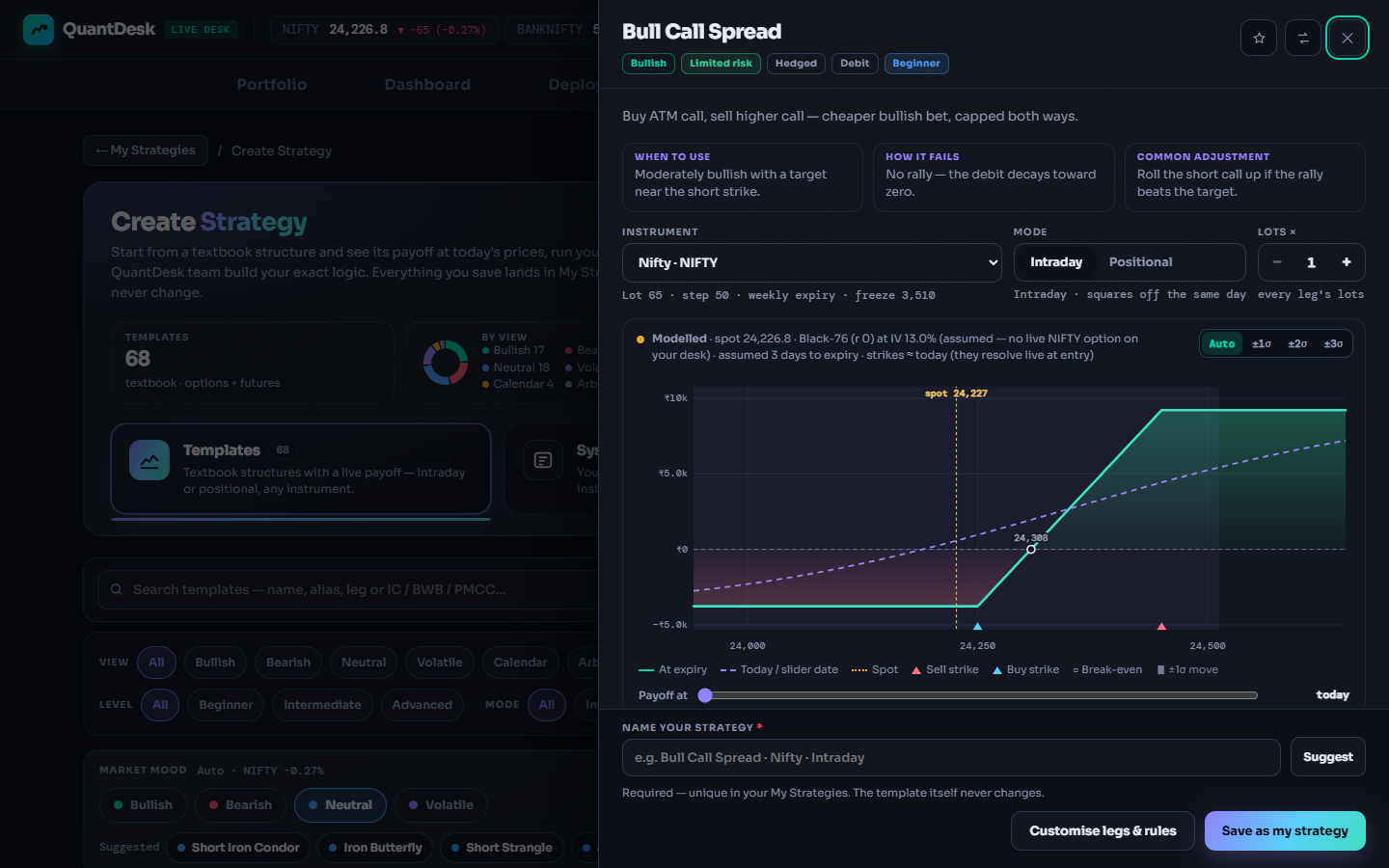
The builder drawer slides in. “When to use”, “How it fails” and “Common adjustment” take ten seconds and tell you the market move that hurts this structure most.
Click the template card
Choose the instrument
Nifty, BankNifty, FinNifty, MidcpNifty, Sensex, or MCX Crude, NaturalGas, Gold, GoldM, Silver, SilverM and Copper. The line below updates with lot size, strike step, expiry and freeze limit. Real MCX orders need the separate MCX plan; MCX paper is free.
Open Instrument
Intraday or Positional
Intraday squares off the same day. Positional holds as NRML and adds Start: Today (now, or the next session) or At DTE N, an entry time to the second, and “Repeat every cycle”.
Set the lots
Lots × runs 1–50 and sets every leg. This is size at 1x; the deploy multiplier scales it later, so keep it small here.
Use the Lots × stepper
Read the payoff and the rules
Max profit, max loss, break-evens, POP, reward:risk and greeks, at today's prices. Below it, the Rules list: entry and exit times, book stop-loss and target, order types and the safety rules. Unlimited-risk templates need the Unlimited risk tick before you can save.
The rules every template carries
- Times honoured to the second; “09:15” means 09:15:00.
- Hedge guard: sells wait until every buy is open. Shorts first on exit.
- Credit check skips entry if the credit is too small for the width. FUT leg SL in futures templates.
- Order types: Market by default on NSE/BSE, which on Indian brokers is a protective limit starting 2% through the price, widening 1% every 3 s, capped at 20%. Futures legs use a tight limit.
- Session close: intraday squares off by 15:39 IST (NSE/BSE) or 23:25 IST (MCX).
Name it and save
3–80 characters, unique in your library; locked base names are reserved. Suggest fills one in (“Bull Call Spread · Nifty · Intraday”). Customise legs & rules opens the full leg editor first if you want it.
Click Save as my strategy
Deploy it on paper
The success panel offers Make another, Open in My Strategies and Deploy now. Keep Paper Trading: the card then shows PAPER and Waiting → 09:20:00 until its entry time.
Click Deploy now → Deploy · Paper
Go further: Customise legs & rules
Templates run on the same Discretion engine as your Systematic Discretion books, so the full leg editor is one click away: strikes by ATM ± steps, OTM/ITM depth, delta, % OTM, premium or relative to another leg; per-leg stop-loss, target and trail; re-entries; and a stop-loss or target on the whole book. The Systematic Discretion guide walks through it.
What can go wrong
- No Create Strategy tabYou are on the US desk. Click the market pill, confirm “Switch to Indian Markets?”.
- Save won't saveName must be 3–80 characters, unique, not a reserved base name; unlimited-risk templates need the Unlimited risk tick.
- Instrument greyed outA futures template, and that instrument has no futures leg. Pick another instrument or an options-only template.
- Deploy now opens plans or “Unlock”Live modes need a plan for that market. A free account with one paper strategy running gets the Unlock 3 paper strategies guide instead.
- Unlimited risk is realShort naked options have no cap on loss. Saving or paper trading sends nothing to your broker; real orders start only in Live Auto. Set a book stop-loss, paper first.
Frequently asked questions
Do I need a broker or a paid plan to use templates?
No. Any account can open templates, save them and run them on Paper Trading. A connected broker and a plan for that market matter only for real orders through Live Auto.
If I edit my saved strategy, does the template change?
No. Saving makes a private copy under your own name. The template never changes, so you can save as many variations as you like.
How many strategies can I save?
No cap. The saved-strategy library is unlimited on every plan, including free. Plan limits apply only to how many run at the same time.
Can I use templates on the US desk?
No. The Create Strategy hub is on the India desk only. Switch the market pill in the header to IN.
Is the payoff chart a forecast of what I will make?
No. It is a model of the structure at today's prices. Real strikes are picked live at entry and real fills differ. Every figure is illustrative, not a performance claim.
Related guides
Manage strategies in My Strategies
Edit parameters and execution settings, read the logic in plain English, duplicate, share and deploy.
AI backtesting with Claude and ChatGPT
Add the QuantDesk connector to your AI assistant and backtest option strategies in plain English.