On this page
Build your first book, in nine steps
Every account comes with 24 locked books: a Discretion Intraday and a Discretion Positional book for each of Nifty, BankNifty, FinNifty, MidcpNifty, Sensex, Crude, NaturalGas, Gold, GoldM, Silver, SilverM and Copper. You cannot rename or delete them; you fill them with legs, or make named copies.
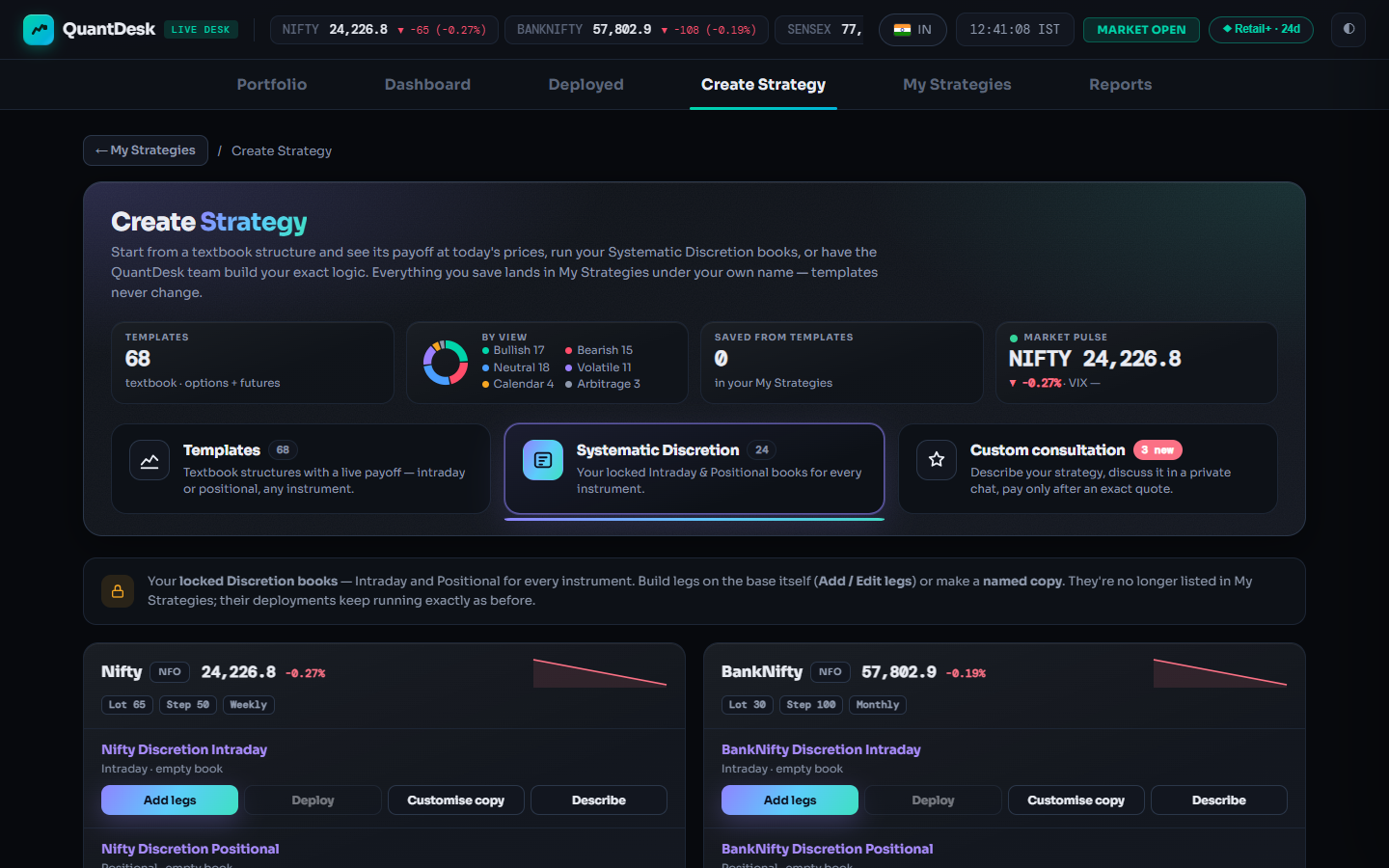
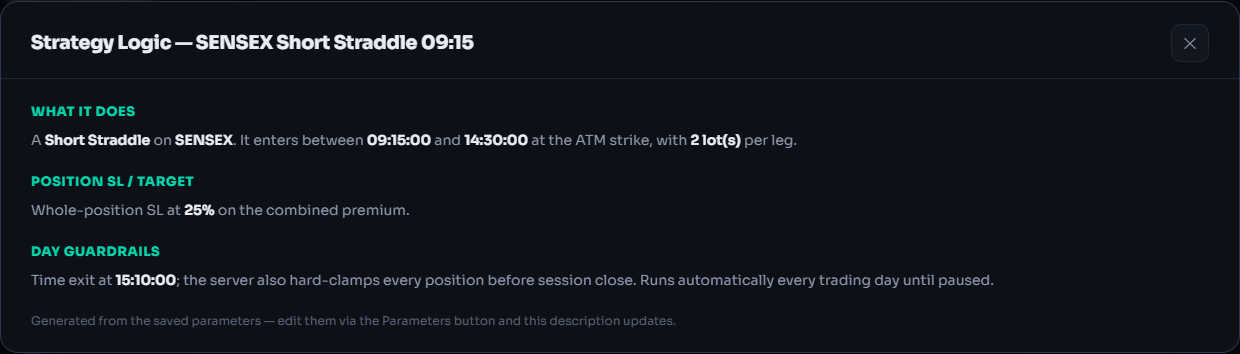
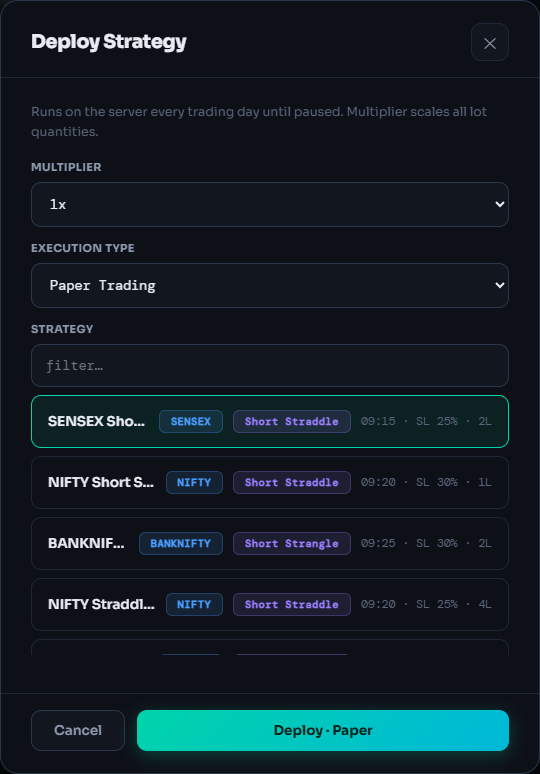
Open Systematic Discretion
The second of the three category tiles in Create Strategy. Its count shows your 24 books. A lock note reminds you: build legs on the base itself, or make a named copy.
Click Create Strategy → Systematic Discretion
Find your instrument
One tile per instrument: live price, sparkline, Lot, Step and weekly/monthly expiry. NSE and BSE indices first, then MCX, whose tiles carry an MCX plan tag (real orders need the separate MCX plan; paper is free).
Add legs, or Customise copy
Add legs builds on the base book. Customise copy makes a named copy you can rename and delete, saved to My Strategies; give each idea on the same instrument its own copy. Deploy stays grey until the book has legs.
Click Add legs
Add a leg
The leg editor opens as Parameters — Nifty Discretion Intraday. Add one leg per option you want.
Click + Add leg
Set side, type and strike rule
Buy or sell, CE or PE, and how the strike is picked: ATM ± steps, OTM/ITM depth, delta, % OTM, premium, or relative to another leg. The per-field ⧉ copy, ⎘ paste and ⇉ apply-to-ticked-legs icons repeat a setting across legs.
Entry, exits and trails per leg
Times take seconds (09:20:05) and commit on blur or Enter. Give each leg a stop-loss and optional target as %, points or an underlying level; a trail (breakeven, step or keep) only tightens; re-entries up to the count you set.
Book-level guardrails
Book stop-loss and book target in rupees per 1x (stop-loss wins if both hit on one tick). Max total lots is a fat-finger cap: a leg that would exceed it waits. Intraday: run mode One time (default) or Every day; NRML by default, or MIS on NSE/BSE (square-off at the MIS time, default 14:58:00). Positional: entry and exit by days to expiry or weekday, or Start = Today; stop-losses can rest at your broker overnight. Order types default to Market, which on Indian brokers is a protective limit (2% through the price, +1% every 3 s, cap 20%).
Save the book
Back on the page the button now reads Edit legs and Deploy is enabled.
Click Save Parameters
Check it with Describe
Read the logic in plain English, written from the current settings. If it does not say what you meant, Edit legs and fix it before you deploy.
Click Describe
Deploy it on Paper
The popup opens with this book picked. The card shows PAPER, then Live-Entered once the legs are in. Intraday books square off by 15:39 IST (NSE/BSE) or 23:25 IST (MCX) if still open.
Click Deploy → Paper Trading → Deploy · Paper
Running: what the engine does with it
- ✕ close on a leg closes that leg at market; the others keep running. Close All legs closes every open leg; the book stays deployed.
- Edit Parameters (live) in the ⋯ menu changes the running book from the next tick. The open position, its entry price and instrument never change.
- Pause freezes: no checks, nothing sent. Resume carries on from the current price.
- Adopt a position you already hold: + Already-open position in the editor, or + Add running position (adopt, no order) on the card. Taken over at your average price, tagged ADOPTED, never multiplied, no order sent.
What can go wrong
- Deploy is greyed outThe book has no legs. Add legs, add at least one, save.
- Can't rename or deleteThe 24 books are locked bases. Customise copy gives you a copy you can.
- A leg was not placedCheck max total lots; a leg over the cap waits. The card's Notification Log gives the reason.
- Skipped TodayA day filter (DTE, weekday, week of month) excluded today. The book stays deployed.
- Pausing a positional bookPause cancels the stop-loss resting at your broker: while paused there is no stop-loss and no expiry-day exit. Resume soon, or square off.
- Adopting sends no orderAdopt only lots you really hold; the quantity you enter becomes a real order when the book exits.
Frequently asked questions
How is Systematic Discretion different from a template?
A template starts with a textbook structure already filled in. A Discretion book starts empty and you add every leg. Both run on the same Discretion engine with the same risk controls.
Can I rename or delete a Discretion book?
No. The 24 books are locked bases every account gets. Add and edit legs on them, or press Customise copy for a named copy you can rename and delete.
Why can't I find these books in My Strategies?
On the India desk they live under Create Strategy → Systematic Discretion. Named copies you make are saved to My Strategies like any other strategy.
Can I add a position I already hold at my broker?
Yes. Add it as an already-open position in the leg editor, or use Add running position (adopt, no order) on a running card. It is taken over at your average price; no order is sent and adopted lots are never multiplied.
Does the deployment multiplier scale my book stop-loss?
Yes. Book stop-loss, target and max total lots are set per 1x, so 2x doubles them with the lots. A multiplier change applies from the next fresh entry and never resizes an open position.
Related guides
Deploy on Paper, Live Auto or Live Offline
Pick a multiplier, an execution mode and a broker, and know exactly what reaches your broker in each mode.
Every LiveDesk order and strategy status
What every card chip and Order Book status means, whether anything reached your broker, and what to do.