On this page
Live plan explorer
Pick a family, then a period. Prices come straight from the live catalogue; you buy inside LiveDesk (passes on the Backtest page).
Covers NIFTY, BANKNIFTY, FINNIFTY, MIDCPNIFTY and SENSEX options plus equity strategies. The combo adds Backtest Pro for the same days.
MCX is its own family with its own slots and expiry. The India plan does not cover MCX; MCX paper stays free.
One payment credits both plans at the same tier for the same days. Slots and expiry stay separate.
Priced in dollars, charged in rupees through Razorpay at the rate on each card. Separate from India plans. Free US paper: 1, 3 once Tradier is connected (no static IP).
Backtest passes are bought on the Backtest sign-in page: pay once, no auto-renew, days stack.
Use-case words on plan cards (such as “multi-leg books”) are descriptions, not limits. The only limits are the live and paper counts.
From free to an active plan, in eight steps
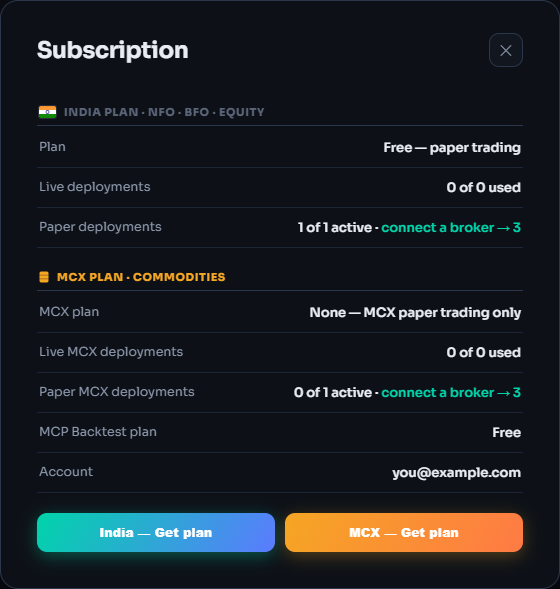
Start free: 1 paper strategy per market
India, MCX and US are counted separately. Paper is the full engine on live prices with simulated fills; nothing reaches a broker. Press Deploy with the slot full and this guide opens.
Connect a broker → 3, still free
On the India desk “connected” means the broker logged in once through its static IP; Tradier needs none. The unlock happens by itself. Delete the broker later and new paper deploys fall back to 1.
Account menu → Subscription shows your slots per family
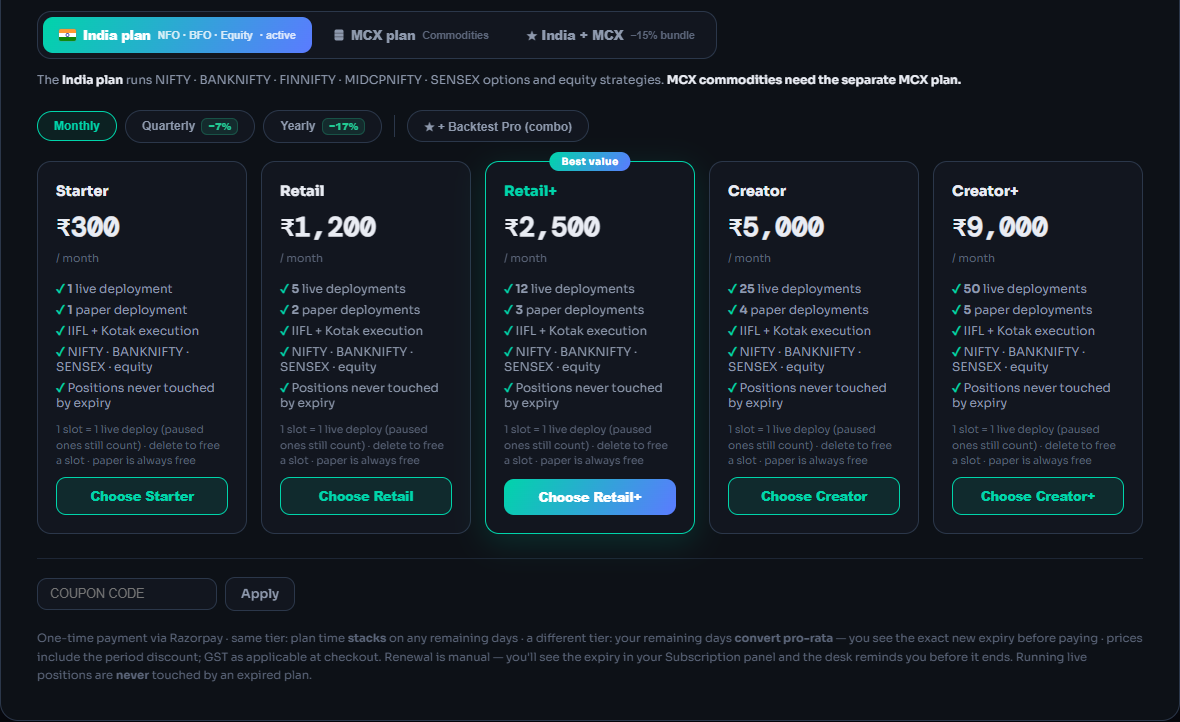
Open the plans sheet, pick the family
India plan (NFO · BFO · Equity), MCX plan or ★ India + MCX. On the US desk the sheet shows US plans.
Click Upgrade Now, your plan chip, or Plans & Upgrade
Choose the period, add Backtest Pro if you want
Monthly (30 days), Quarterly (90) or Yearly (365); the discount shows on the switch. + Backtest Pro (combo) credits both products for the same days in one payment.
Compare tiers and choose
Each card lists its live and paper deployments. 1 slot = 1 live strategy; paused ones still count, and Live Offline counts as live. Only Delete frees a slot.
Click Choose <Tier>
Coupon (optional)
Type it and press Apply before choosing a tier. A coupon can be limited to India, MCX, US or a combo. Backtest passes take no coupons.
Check “Before you pay”, then pay
The quote shows your live limit before and after, “You pay now ₹…” and the new expiry; it closes after 10 minutes. India: pay online (card, UPI or net banking) · 18% GST added at checkout. Nothing renews automatically. The plan switches on once the payment is confirmed.
Click Continue to payment
Same tier vs different tier
Same tier: the new period stacks on your remaining days. Different tier: remaining days convert pro-rata at list prices (monthly ÷ 30 per day), then the bought period is added. A combo at a lower tier lowers your India live limit, and LiveDesk warns you first.
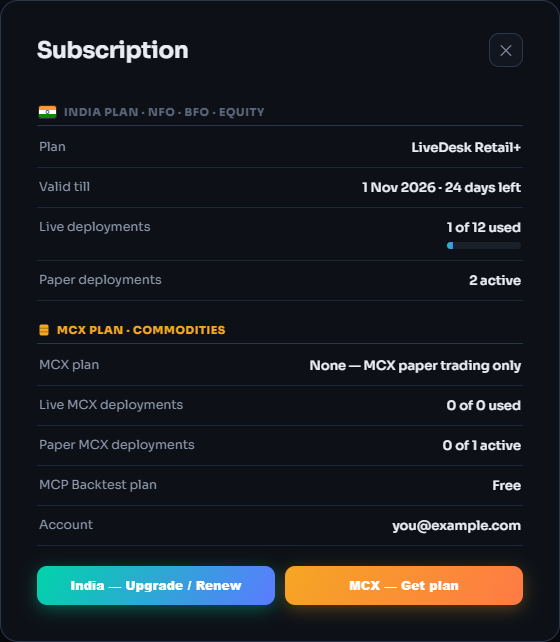
Plan active: watch the days
“Plan active — LIVE execution is unlocked.” The top bar's plan chip turns amber with 7 days left and a reminder appears on each visit. Nothing renews by itself: renew from Subscription.
When a plan ends
An expired plan never squares off a position. A live strategy holding one keeps managing it; once flat it shows 🔒 BLOCKED and places nothing. Checked when you open the desk and nightly at 23:55 IST. Renew, upgrade or delete another live strategy and the oldest blocked ones unblock at once.
Which plan for which market
- IndiaNFO/BFO index options and equity. Bought in the LiveDesk plans sheet; combo adds Backtest Pro.
- MCXCommodities. Own slots and expiry. Bundle with India for one payment.
- USSPX, SPY and QQQ options on Tradier. Bought on the US desk; $ prices, ₹ charge; no combo.
- BacktestFree plan plus pay-once Pro passes, on the Backtest sign-in page. Static IPs are a separate purchase on the Brokers page.
What can go wrong
- Money deducted, plan not activeDon't pay again. Still nothing? Email support@kartapurakh.com with the Razorpay payment ID.
- “LiveDesk plan needed” / “MCX plan needed”Live Auto and Live Offline need a plan for that strategy's family. Paper needs none.
- “Live slots full”Every slot is used, paused ones included. Delete one (square it off first: Delete sends nothing to close) or move up a tier.
- Coupon won't applyWrong product, expired or used up. Coupons work only in the LiveDesk plans sheet.
Frequently asked questions
Is paper trading really free?
Yes. A free account runs 1 paper strategy at a time per market (India, MCX and US count separately) on live prices with simulated fills. Connect a broker and the limit rises to 3, still free.
Does the India plan cover MCX or the US desk?
No. The India plan covers NSE and BSE index options and equity. MCX needs the separate MCX plan (or the India + MCX bundle); the US desk has its own US plans.
Do plans renew automatically?
No. Every purchase is a one-time payment for a period. LiveDesk reminds you when 7 days or fewer remain, and you renew by hand.
What happens to open positions when a plan expires?
Nothing is squared off because a plan ended. A live strategy holding a position keeps managing it; once flat it is blocked and places nothing until you renew, upgrade or free a slot.
Can I change tier in the middle of a plan?
Yes. The same tier adds days on top of what you have left; a different tier converts your remaining days pro-rata at list prices. LiveDesk shows the exact new expiry before you pay.
Related guides
Deploy on Paper, Live Auto or Live Offline
Pick a multiplier, an execution mode and a broker, and know exactly what reaches your broker in each mode.
AI backtesting with Claude and ChatGPT
Add the QuantDesk connector to your AI assistant and backtest option strategies in plain English.