On this page
Eight steps on one page
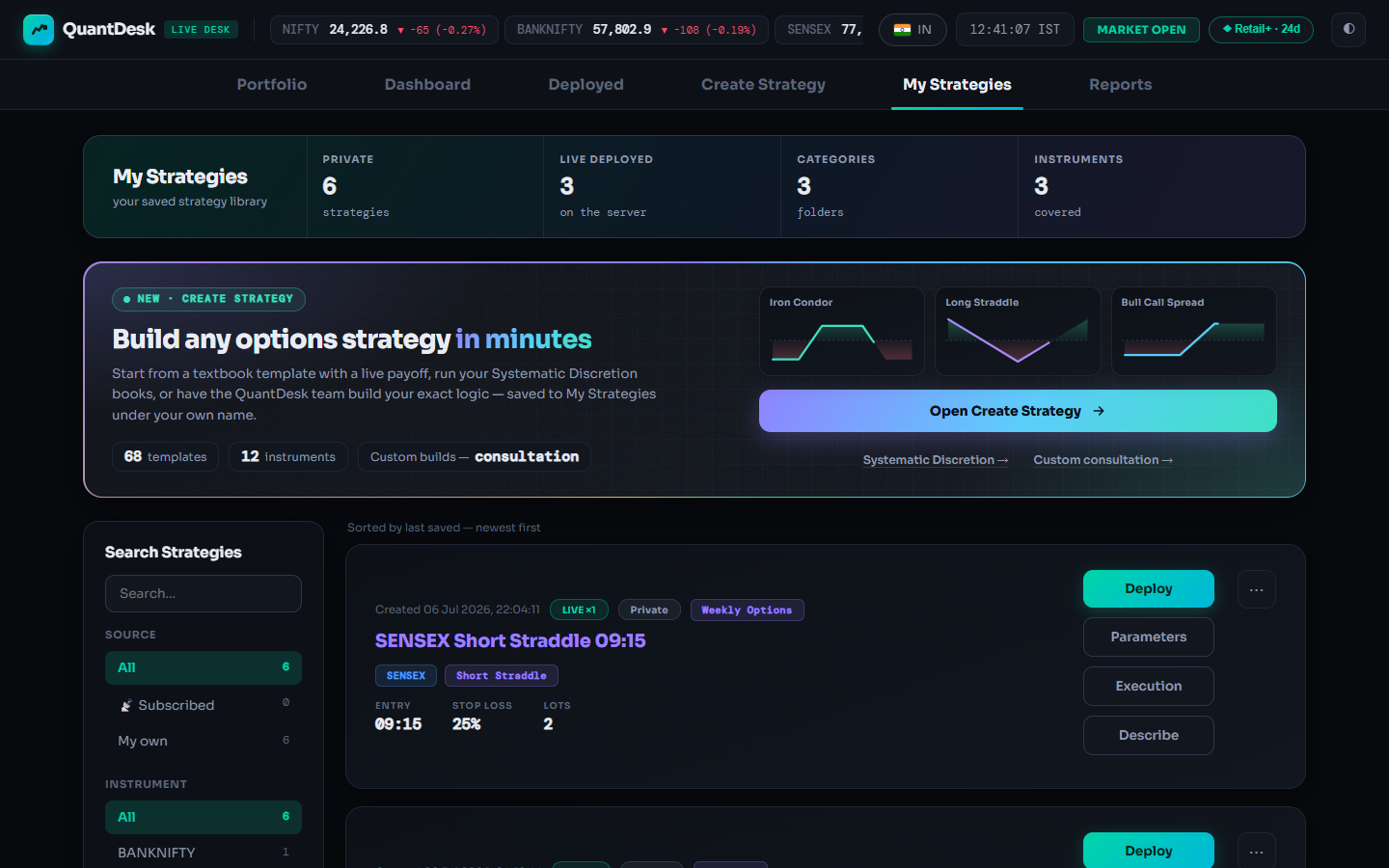
Everything you save lands here: template copies, named Discretion copies, custom builds and strategies you subscribe to. A saved strategy does nothing until you deploy it. There is no cap on saved strategies, on any plan.
-
 1
2
3
4
1
2
3
4
My Strategies. Hover a pin. Sample strategies. 1Open My Strategies
Cards are newest first, 10 to a page. Each shows when it was saved, LIVE ×N while deployed, its visibility (Private, Public, Public · dup, 📡 Subscribe-mode), its name, instrument and type, then Entry time, Stop Loss and Lots at 1x.
Click My Strategies in the top row. Filter by Source, Instrument, Type or Category; Reset clears.
Why / details
A 🔒 Base card is a locked starter every account gets: edit and duplicate it, but not rename or delete it. India and US desks keep separate libraries; switch with the IN / US pill. "No strategies yet" means click + Create Strategy and follow Create a strategy from a template.
-
Parameters opens grouped by topic. Sample values. 2Open Parameters
The editor shows only this strategy's own settings, grouped: entry and exit, day caps, strike selection, combined SL and target. A banner says how many unused groups are hidden.
Click Parameters on the card. Show all reveals hidden groups.
-
SL value 25 → 30, then Save Parameters. Sample values. 3Change a value and save
Times accept seconds (09:15:04). Money caps such as day max loss are per 1x; the deployment multiplier scales them. Zero usually means off, and the label says so. Running deployments keep their snapshot; the change applies from the next deploy or fresh entry.
Edit the field, click Save Parameters.
To change a strategy that is already running
On the Deployed tab open the card's ⋯ menu and choose Edit Parameters (live): the same editor, applied from the next tick for anything not already hit, and it also updates the saved strategy. The open position, its entry price, the strategy type and the instrument never change.
-
Strategy Logic now reads "Whole-position SL at 30%". Sample strategy. 4Read the logic with Describe
"Strategy Logic — name" is written from the saved parameters, under What it does, Position SL / target and Day guardrails. Change a parameter and the description changes with it. Read it before every first deploy.
Click Describe on the card.
Why / details
On a deployed card, Definition in the ⋯ menu does the same from the running deployment's current parameters.
-
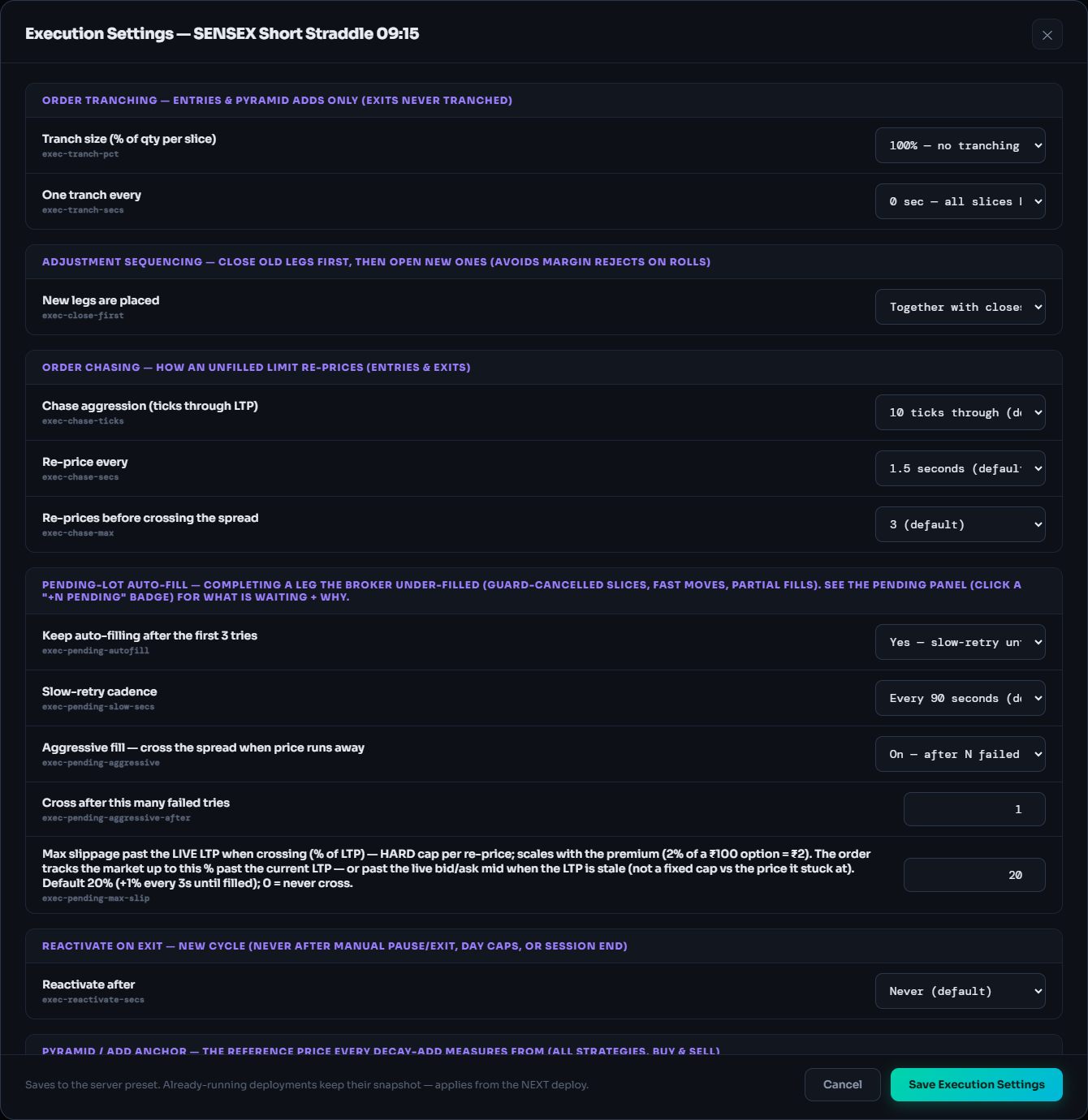
Execution Settings, defaults shown. Click to zoom. 5Tune Execution
Parameters decide what the strategy trades; Execution decides how its orders are worked at the broker: tranching, adjustment sequencing, order chasing, pending-lot auto-fill, reactivate on exit.
Click Execution, change a setting, click Save Execution Settings.
Groups and defaults
- Order Tranching: split entries and pyramid adds into slices (exits never split). Default 100%, 0 s gap.
- Adjustment sequencing: new legs together with closes, or only after closes confirm (safer for margin on rolls). Default together.
- Order chasing: 10 ticks (MCX 3), every 1.5 s, 3 re-prices before crossing the spread.
- Pending-lot auto-fill: on, every 90 s, aggressive fill on, 20% cap.
- Reactivate on exit: never. Pyramid anchor: Max(paper, broker). Condition checking: continuously. Opening-spike guard: 10 s (live only).
- Freeze limits are always on: NIFTY 3510, BANKNIFTY 1440, SENSEX 1000, FINNIFTY 3240, MIDCPNIFTY 5760 quantity; MCX orders are not split.
-
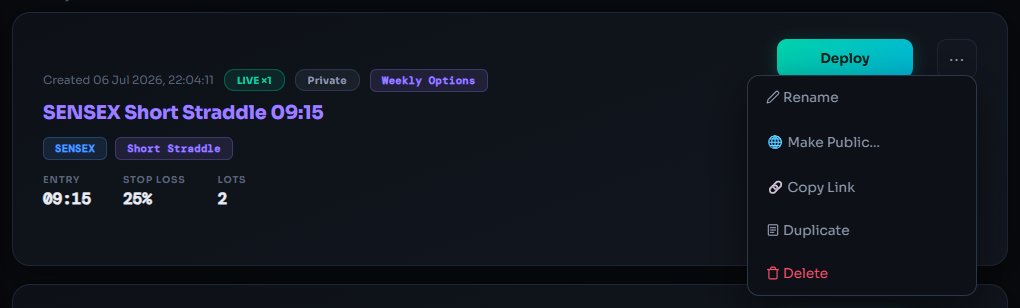
The ⋯ menu on one of your own strategies. 6Rename, duplicate or delete
Duplicate asks for a new name and copies every parameter and execution setting; the copy is private and independent. On a 🔒 Base strategy, Rename and Delete are locked, so duplicate it first.
Click ⋯ → Rename, Duplicate or Delete.
-
🌐 Make Public… Illustration
Link🌐 Public + allow duplicationAnyone with the link copies the full strategy into their library.👁 Public · view-onlyVisitors see the name, instrument and type. Logic hidden.📡 Subscribe modeFollowers deploy with their own multiplier. Logic hidden; your edits reach them instantly.kartapurakh.com/strategy/…7Share it, or keep it private
Publishing creates a permanent link and asks what visitors can do. The public page shows name, creator, instrument and type with a Duplicate to my account or 📡 Subscribe button; it never shows parameters. 🔒 Make Private stops the page immediately; the link stays the same if you publish again.
Click ⋯ → 🌐 Make Public…, choose, then 🔗 Copy Link.
Subscribe mode: your edits reach followers instantly
A subscriber's copy stays linked to yours. Every change applies to them at once, including running deployments on their own brokers. Test changes on a duplicate first. A strategy you follow shows 📡 Subscribed · by its creator and only Deploy and Unsubscribe; stop its deployments before unsubscribing.
-
Deploy opens the popup with this strategy picked. Sample names. 8Deploy
Opens the Deploy popup with this strategy already selected. Start on Paper Trading: free, and nothing reaches any broker.
Click Deploy on the card, then Deploy · Paper.
What can go wrong
- I changed Parameters but my running strategy didn't change
By design: running deployments keep their snapshot. Use Edit Parameters (live) on the Deployed card.
- Rename and Delete are greyed out
The card is 🔒 Base. Duplicate it, then rename or delete the copy.
- I can't find my Discretion books
On the India desk they live in Create Strategy → Systematic Discretion. Named copies you make do appear here.
- A strategy I saved is missing
Check the desk (IN / US pill): each keeps its own library. Then clear the filters with Reset.
- Unsubscribe is refused
Stop that strategy's deployments on the Deployed tab first.
- My shared link says the strategy is private
It was made private. Choose 🌐 Make Public… again; the link stays the same.
Frequently asked questions
Is there a limit on how many strategies I can save?
No. The saved-strategy library has no cap on any plan, free included. Plan limits only apply to how many strategies are deployed at the same time.
If I edit Parameters in My Strategies, does my running deployment change?
No. Running deployments keep their snapshot, and your change applies from the next deploy or fresh entry. To change a running deployment, open its card on the Deployed tab and use Edit Parameters (live) from the menu.
What is the difference between Describe and Definition?
Both explain a strategy's logic in plain English. Describe, in My Strategies, is written from the saved parameters. Definition, in a deployed card's menu, is written from that running deployment's current parameters.
If I make a strategy public, can people see my logic?
It depends on the choice. Public view-only shows only the name, instrument and type. Subscribe mode keeps parameters and logic hidden; followers can only deploy it. Public with duplication lets anyone with the link copy the full strategy into their own library.
Why do some cards show only Deploy and Unsubscribe?
Those are strategies you subscribed to. The creator manages their parameters, so Parameters, Execution and Describe are hidden. You choose only the multiplier and where to deploy.
Related guides
Create a strategy from a template
Pick one of 68 textbook structures, check its live payoff and save it as your own strategy.
Deployed tab and Dashboard, explained
Every card control and what it sends to your broker, the Pending panel and the Desk ⇆ Broker Check.