On this page
Eight steps: five in Reports, three in Portfolio
Reports keeps three separate books and never blends money you risked with money you did not. Every P&L figure is gross first; the net figure is an estimate.
-
Reports opens on the Live Auto book. Illustrative data. 1Open Reports and pick a book
Live Auto is the headline book. Live Offline and Paper have their own tiles, each with traded days and P&L for the period. The three are never mixed.
Click Reports in the top row, then a book tile.
How a day is counted
- A strategy-day counts as Live Auto only if it ended the day, or was paused, in Live Auto.
- Switching to Live Offline during the day puts that whole day in the Live Offline book.
- Deleted strategies stay in the record; Incl. deleted counts them or not.
- "Today is still open": today's strategy-days settle after the day closes. Refresh rebuilds them at most once a minute.
-
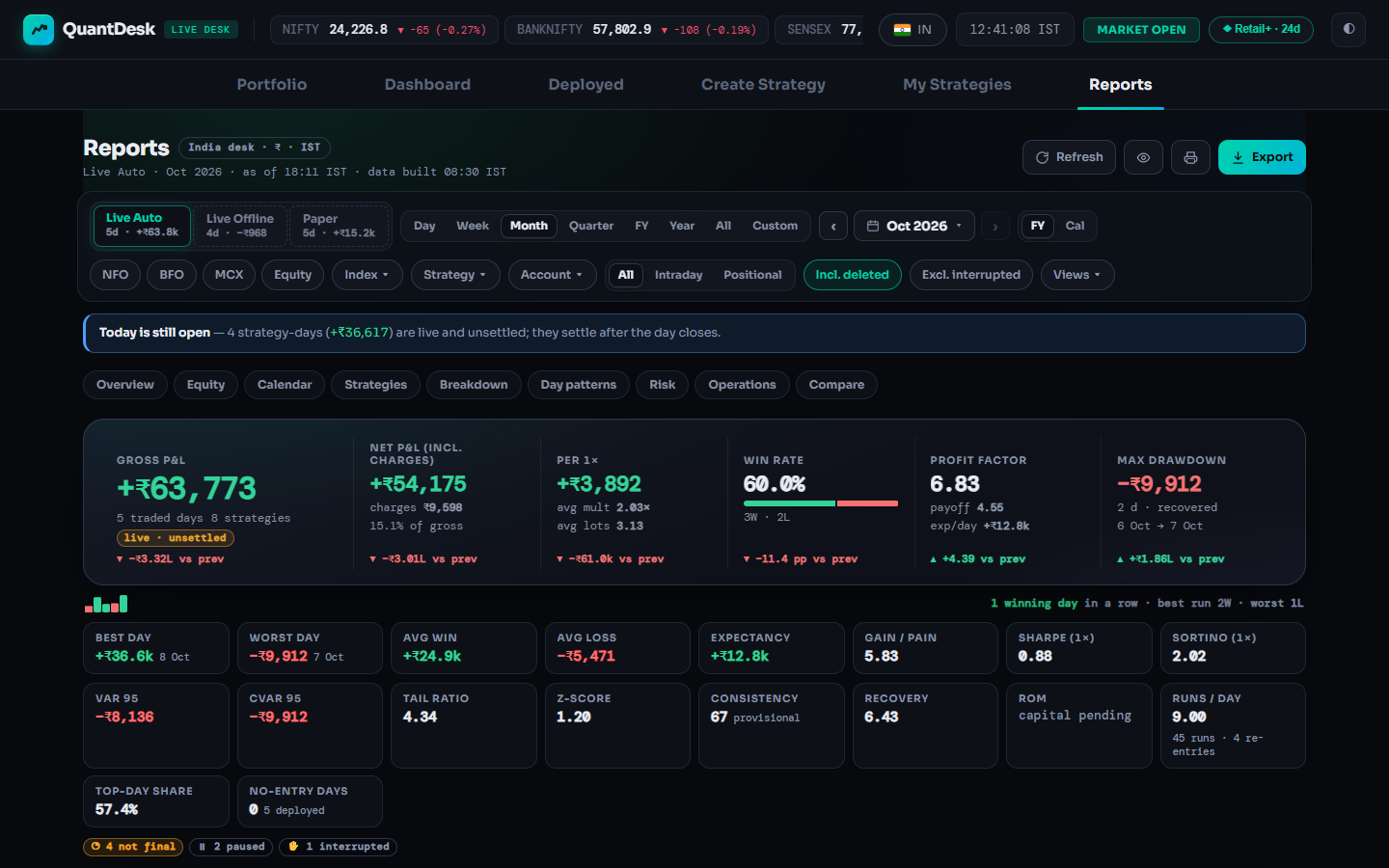 1
2
1
2
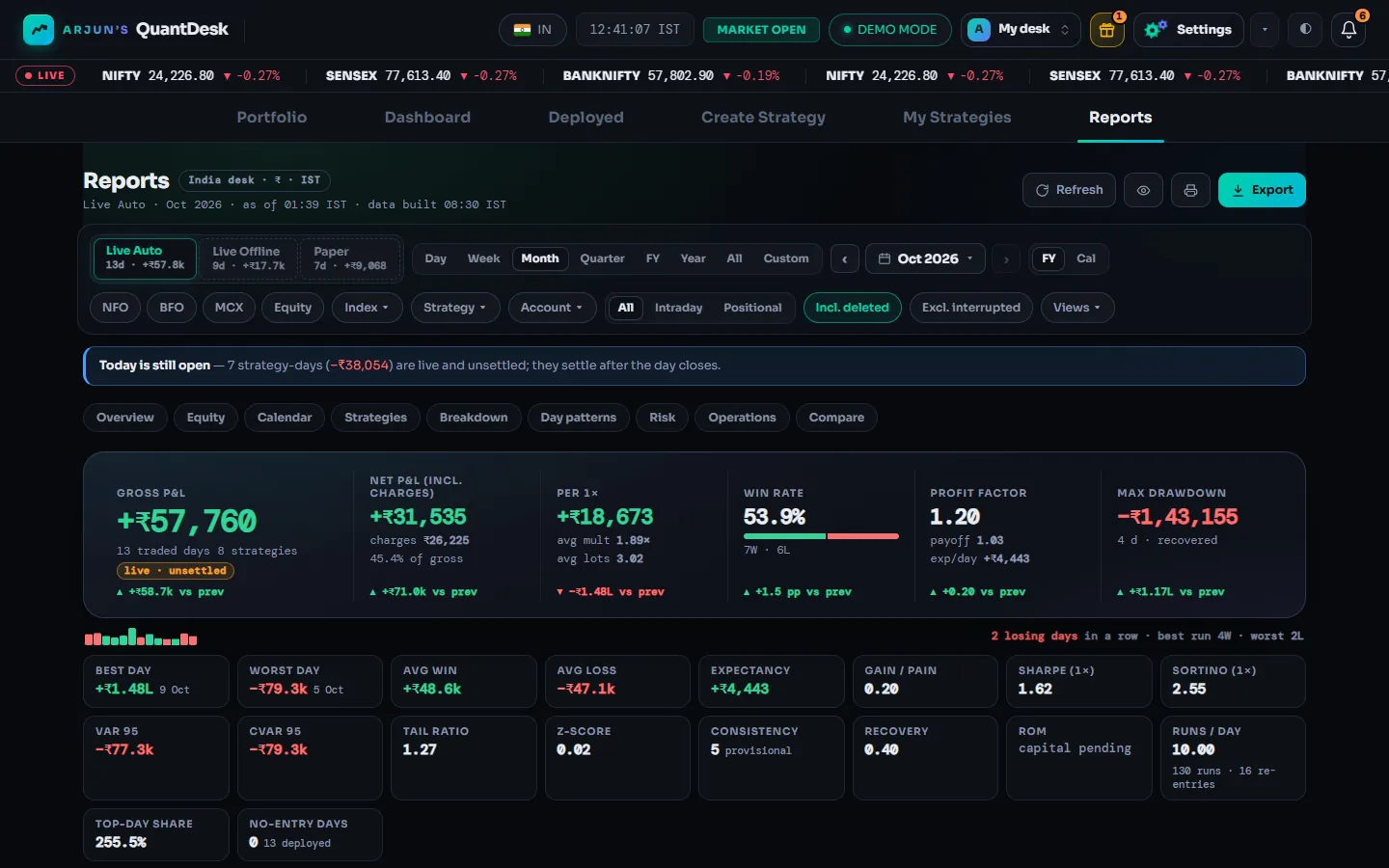
Period chips and filters. Illustrative data. 2Pick a period and filters
Day, Week, Month, Quarter, FY, Year, All or Custom; ‹ › step back and forward. Filter by segment (NFO, BFO, MCX, Equity), Index, Strategy, Account, Intraday / Positional. Views holds presets such as "This FY · Live Auto".
Click a period chip; use FY / Cal to switch year types.
-
3Read the headline numbers
Gross P&L, Net P&L (incl. charges), Per 1x (results per 1x of multiplier, so different sizes compare fairly), Win rate, Profit factor and Max drawdown, each against the previous period. Below them: best and worst day, average win and loss, expectancy, Sharpe, Sortino, VaR and CVaR.
Hover a tile for its definition. Gross matches your broker's trade book; net is an estimate.
-
Equity → Calendar → Strategies → Breakdown → Day patterns → Risk. Illustrative data. 4Jump to a section
Equity (curve, drawdown, NIFTY overlay, what-if multiplier slider), Calendar (green and red days, holidays marked), Strategies (every strategy with a trend sparkline), Breakdown (treemap), Day patterns (weekday, days to expiry, month), Risk, Operations and Compare.
Click a section tab under the banner, or scroll.
Why / details
Everything follows the book, period and filters you picked. Past results describe what happened on your account; they are not advice and do not predict future returns. Strategy logic is shown only for your own strategies; a strategy you follow from a creator shows a lock.
-
Export, on a phone. Illustrative data. 5Export a PDF, CSV or Excel report
The export contains exactly what is on screen, so set the book, period and filters first. Formats: PDF report (A4 on the India desk, US Letter on the US desk), CSV — daily rows, CSV — strategies, or the Excel workbook (.xlsx) with Summary, Daily, Strategies, Monthly, Calendar, Logic, Changes, Audit and About sheets.
Click Export (top right), then a format.
Why / details
For a single strategy, its card's ⋯ → Statistics has its own equity curve, drawdown and calendar, with Print / PDF and an HTML report download.
-
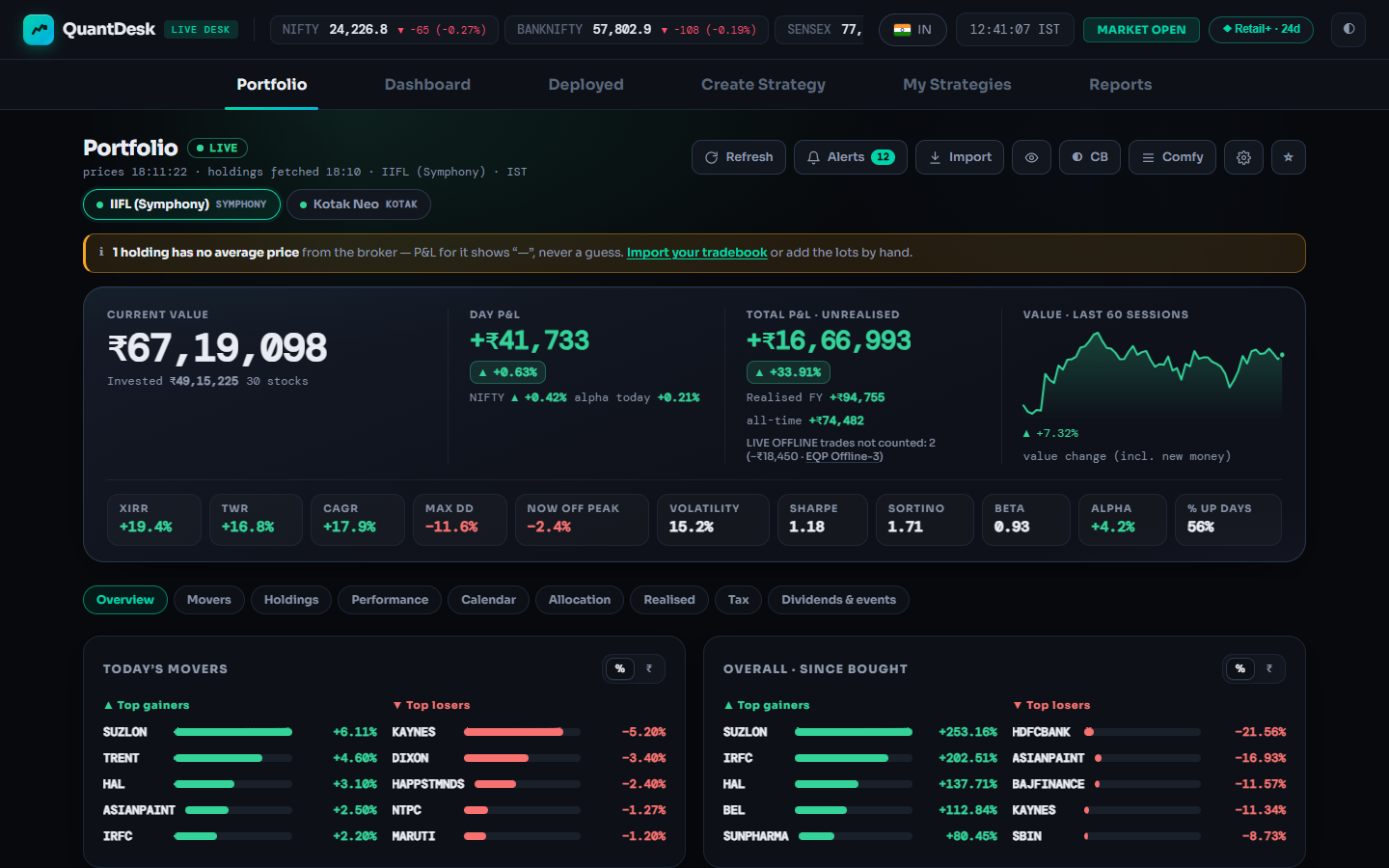
Portfolio: value, day P&L, risk, movers. Illustrative data. 6Open Portfolio
The first tab on the India desk. Holdings across connected brokers with live value and P&L: current value, day P&L against NIFTY, unrealised and realised P&L, a 60-session chart, then XIRR, TWR, CAGR, drawdown, Sharpe, beta and alpha. View only, no buy or sell buttons.
Click Portfolio; switch brokers with the chips. ★ makes it your start tab.
Why / details
Without a connected broker it reads "Link a broker to see your portfolio". Refresh asks each broker at most once every 120 seconds. The eye icon blurs amounts for screen sharing; CB is a colour-blind palette; density is Comfy, Compact or Ultra.
-
Holdings, with "in strategy A · rest not on LiveDesk" per stock. Illustrative data. 7Holdings, and which shares belong to which strategy
For each stock, Portfolio splits your quantity between LiveDesk equity strategies and the rest. Only live equity strategies count; Live Offline trades are left out of realised P&L, the tax view and the statistics. A "—" instead of P&L means the broker sent no average price; LiveDesk never guesses one.
Click Holdings; fix a "—" with Import your tradebook (CSV) or add the lots by hand.
-
Alerts, in the Portfolio toolbar. Illustrative data. 8Set a portfolio alert
Price (a level, a band, day change, gaps), your position (return from cost, a trailing stop, nearing a strategy's SL or target, a lot turning long-term), technicals (volume spike, moving-average cross, RSI) and the whole portfolio (day P&L, drawdown, versus NIFTY, sector concentration). Alerts are checked on the server every second and respect exchange holidays.
Click Alerts → + Stock alert or + Portfolio alert; choose delivery: card with sound, desktop notification, or ringing until tapped.
What can go wrong
- A strategy or a day is missing from Reports
Check the book first (a day that switched to Live Offline lives there; paper shows under Paper), then the period, segment chips, Intraday / Positional, Incl. deleted and any saved View.
- Today's numbers keep changing
Today is still open; its strategy-days settle after the close. Refresh rebuilds them at most once a minute.
- Net P&L does not match my contract notes
Net uses LiveDesk's estimate of charges. Gross matches the trade book; your contract notes have the exact charges.
- Portfolio is empty or the tab is missing
It needs a connected broker and exists only on the India desk. If the market pill reads US, click it to switch back.
- Refresh does nothing
Portfolio asks each broker at most once every 120 seconds. Wait, then refresh again.
Frequently asked questions
Are paper trades included in my Reports totals?
No. Reports keeps three separate books: Live Auto, Live Offline and Paper. Live Auto is the headline book. Paper and Live Offline results are never mixed into live totals; switch the book at the top of Reports to see them.
I switched a strategy from Live Auto to Live Offline during the day. Where does that day count?
In the Live Offline book. A strategy-day counts as Live Auto only if it ended the day, or was paused, in Live Auto.
Is the P&L in Reports gross or net?
The headline is gross P&L. Net P&L (incl. charges) sits next to it and subtracts LiveDesk's estimate of brokerage, statutory and exchange charges.
Can I buy or sell from the Portfolio tab?
No. Portfolio is view only and has no order buttons. It reads your holdings from your connected broker so you can track them in one place.
Are Reports and Portfolio available on the US desk?
Reports is available on both desks; on the US desk amounts are in dollars, times are Eastern, PDFs use US Letter paper and there is no FY period. Portfolio is available on the India desk only.
Related guides
Deployed tab and Dashboard, explained
Every card control and what it sends to your broker, the Pending panel and the Desk ⇆ Broker Check.
AI backtesting with Claude and ChatGPT
Add the QuantDesk connector to your AI assistant and backtest option strategies in plain English.