On this page
Seven steps, from the IN pill to a live SPX card
The US desk has its own strategies, brokers, deployments, journals and plans; nothing is shared with India. Cards, statuses, the Order Book and Reports work as in the other guides.
-
IN pill → "Switch to US Markets?" → Switch. Sample data. 1Click the IN pill, then Switch
The market pill in the top bar reads IN on the India desk. The popup explains that the desk reloads against the US desk with its own strategies, brokers, deployments and journals.
Click IN in the top bar, then Switch.
Why / details
Switch back any time: click US and confirm Switch to Indian Markets?. Your choice is remembered in this browser, so LiveDesk opens on the desk you used last.
-
US pill, SPY · QQQ · SPX prices, ET clock, dollar tiles. Sample data. 2Confirm you are on the US desk
The pill reads US, prices show SPY, QQQ and SPX, the clock is in ET, and the tabs are Dashboard, Deployed, My Strategies and Reports. Portfolio and Create Strategy are India only. P&L, day caps and the trailing lock are in dollars.
Check the pill and the clock.
-
3Know the session
US session 09:30–16:00 ET; intraday square-off at 15:58 ET. Every time setting is honoured to the second, in ET. Because the desk runs on New York time, the IST equivalent shifts when US daylight saving starts or ends.
Compare the three clocks. Set your strategy times in ET.
India desk vs US desk
Topic India desk US desk BrokerIIFL, Kotak Neo and other supported Indian brokersTradier onlyStatic IPNeeded per Indian brokerNot neededUnderlyingsNIFTY, BANKNIFTY, SENSEX and more, equity, MCXSPX and SPY optionsSquare-off15:39 IST (NSE/BSE), 23:25 IST (MCX)15:58 ETSizeExchange lot sizes, freeze-limit splits1 lot = 1 contract (multiplier 100); opening orders above 50 contracts are refusedPlansIndia and MCX plansSeparate US plans, in dollars -
Email chip → Brokers → + Add Broker → Tradier (US). Sample data. 4Add your Tradier account
Tradier is the only broker on the US desk, and it needs no static IP. Paste the API Token (production Bearer) from your Tradier dashboard under API Access, and your Account Number. Optionally tick Client Telegram alerts.
Click your email chip → 🔗 Brokers → + Add Broker → Tradier (US) → fill the fields → Save.
Keep your token private
The API token lets software trade your Tradier account. Paste it only into LiveDesk's Add Broker form. LiveDesk never shows a saved secret back to you; to change it, use Edit config on the broker card.
-
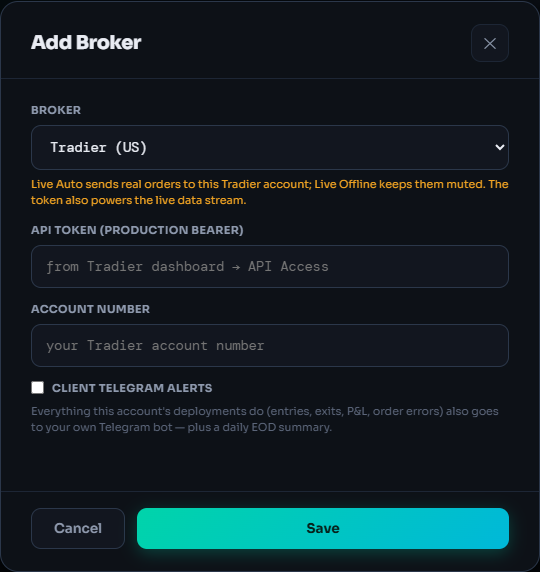
Save, then check the card reads Active. 5Check the broker card
It should show Active. Inactive means press ↻ Reactivate. Connecting Tradier also raises your free US paper limit from 1 strategy to 3.
Read the chip on the Tradier card; ↻ Reactivate if needed.
Why / details
If Tradier is missing from the list or the save fails, email support@kartapurakh.com.
-
Deploy Strategy Illustration
Multiplier1xExecution TypePaper TradingStrategySPX Short Straddle 10:00 · SPX · 0DTE · 1 LCancelDeploy · Paper6Deploy a US strategy
My Strategies on the US desk lists only US strategies (the Create Strategy hub is India only). A US strategy reaches your library from its shared link via Duplicate to my account or 📡 Subscribe; if you need one built, email support. Then deploy as on India: Paper Trading first.
Click Deploy, choose the mode (and Tradier for live), click Deploy · Paper.
Live Auto trades real money
LIVE · Tradier means every signal is a real Tradier order. Keep sizes small at the start; same-day options can move to zero or multiply quickly. Live Auto needs an active US plan. LIVE OFFLINE · Tradier runs the engine with orders muted. On the US desk a market order still unfilled after 60 seconds is tagged STUCK; it keeps working.
-
SPX straddle, open + close$4.194 contract-sides × ($0.35 + $0.6975)SPY straddle, open + close$1.794 contract-sides × ($0.35 + $0.0975)Illustrative, with the default commissionNot a quote. Your Tradier statement has the exact charges. Charges feed Net P&L only and never change a trading decision.
7Know what a trade costs on the desk
Per contract, per side: the strategy's brokerage setting read as dollars per contract ($0.35 if blank; a literal 0 means $0; above $5 is treated as a mistake and becomes $0.35), plus a fee of $0.6975 for SPX, $0.0975 for SPY or $0.10 for others.
Set brokerage in the strategy's Parameters if yours differs.
US plans
Paper trading on the US desk is free: 1 paper strategy at a time, or 3 once Tradier is connected. Live Auto needs a US plan, separate from India and MCX plans in both directions, shown in dollars and charged in rupees through Razorpay as a one-time payment with no auto-renew.
Loading
$000
/ month
- loading
- loading
Loading
$000
/ month
- loading
- loading
Loading the current US plans…
What can go wrong
- "… is a US instrument — flip to US Markets to deploy it."
You tried to deploy a US strategy on the India desk (or the reverse). Switch desks with the market pill and deploy again.
- Order Failed at entry
The opening order was above 50 contracts, or the quantity worked out to zero. Read "Live order NOT placed: …", lower the lots or multiplier, then Reactivate.
- Live Auto is blocked or asks for a plan
Live Auto on the US desk needs an active US plan; an India plan does not count. Muting to Live Offline is always allowed.
- I can't find Portfolio or Create Strategy
They exist only on the India desk. Switch back with the US pill.
Frequently asked questions
Do I need a static IP for Tradier?
No. Static IPs are only for Indian broker accounts. On the US desk you connect Tradier with your API token and account number.
Does my India plan work on the US desk?
No. US plans are separate. An India or MCX plan grants nothing on the US desk, and a US plan grants nothing on the India desk. Paper trading is free on both.
Can I see my India strategies on the US desk?
No. The two desks share nothing: each has its own strategies, brokers, deployments and journals. Switch back with the market pill in the top bar.
Why was my opening order refused?
On the US desk an opening order above 50 contracts is refused before it is sent. Lower the lots or the multiplier. Closing orders are never blocked by this cap.
Can I backtest SPX or SPY before trading it?
Yes, with QuantDesk Backtest on a Pro pass. US SPX and SPY data and backtests are Pro only, use the Python engine, and cover a recent, growing history. See AI backtesting with Claude and ChatGPT.
Related guides
Deploy on Paper, Live Auto or Live Offline
Pick a multiplier, an execution mode and a broker, and know exactly what reaches your broker in each mode.
Plans and pricing explained
Free paper trading, the 1 to 3 paper unlock, live slots, renewals and live prices for every plan.