On this page
Two products, one account
Backtest answers “would this have worked?”; LiveDesk answers “run it for me.” Use either alone or both together. Connector address for your assistant: https://mcp.kartapurakh.com/mcp
From sign-in to live, in nine steps
Every step below is a real LiveDesk screen. Nobody should start with real money: steps 1–5 are free and send nothing to any broker.
Sign in with Google
Open kartapurakh.com/livedesk. Continuing with Google creates your account; the same account works for Backtest.
Click Continue with Google
Land on your desk
The Dashboard opens. The tabs are Portfolio · Dashboard · Deployed · Create Strategy · My Strategies · Reports. A new account's tables are empty.
Click the Create Strategy tab
Pick a strategy
Three ways in: 68 textbook Templates with a live payoff, hand-built Systematic Discretion books, or a paid Custom consultation. Whatever you save lands in My Strategies.
Click a template card, then Save as my strategy
Run it on paper, free
Keep Execution Type on Paper Trading. The full engine runs on live prices with simulated fills; nothing reaches any broker.
Click Deploy · Paper
Watch it run
The card shows PAPER, then Waiting → 09:20:00, Live-Entered and Exited. It runs every trading day with your browser closed.
Why paper first
Paper is the full engine on live market prices with simulated fills, free, with no broker needed. Every status you will see live appears here first, so you learn the card before money is involved.
Get a static IP (India brokers)
Indian brokers accept API orders only from a static IP registered to you. Buy a dedicated one inside LiveDesk, one per broker. Tradier on the US desk needs none. Guide.
Account menu → Brokers → Get my static IP
Connect your broker
Paste your broker's API keys; LiveDesk connects the account through your static IP when you save. Bonus: a free account can now run 3 paper strategies per market instead of 1. Guide.
Click + Add Broker, fill the form, Save
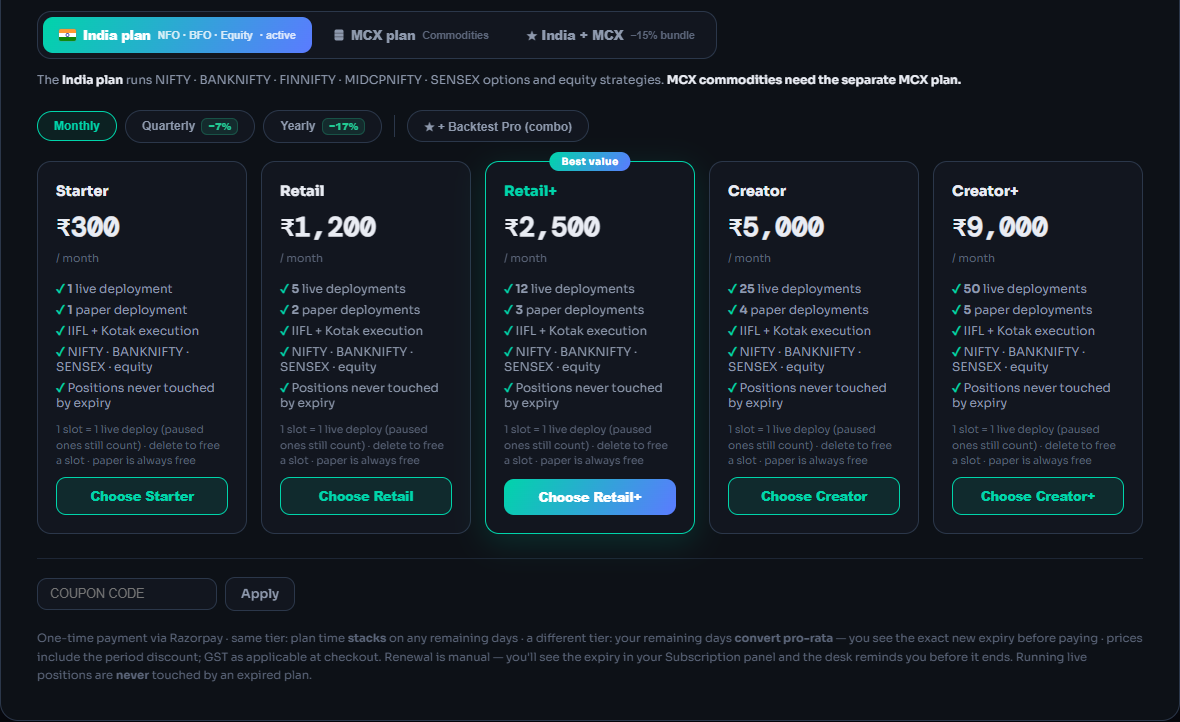
Choose a plan for your market
Live orders need a plan for that market: India, MCX or US. One-time payments, no auto-renew. Guide.
Click Upgrade Now → Choose <Tier>
Go live
Deploy with Live Auto — real broker orders. A red warning names the broker on the button, because from here every signal is a real order. The card shows LIVE · IIFL.
Click Deploy · LIVE (IIFL)
Live Offline, the rehearsal
Live Offline binds the strategy to your broker but keeps orders muted: the engine runs, you mirror trades yourself. It counts as live for plan limits. Switching back to Live Auto is a full take-over: the desk manages every open lot on its book, so match your broker positions to the desk first; the desk does not check.
What protects you
- Your money stays with your broker. Orders use your own API credentials; QuantDesk never holds funds.
- “Market” is protected. On Indian brokers it is a limit that starts 2% through the price and widens 1% every 3 s, capped at 20%.
- Exits touch only their own lots. Manual trades on the same strike are never closed.
- An expired plan never squares off. Blocking happens only once the strategy is flat.
What can go wrong
- Where is LiveDesk?Backtest lives in your AI assistant; LiveDesk is at /livedesk. Same Google account.
- “Unlock 3 paper strategies”Your free paper slot is in use. Stop that strategy, or connect a broker to run 3.
- “LiveDesk plan needed”Live Auto and Live Offline need a plan for that market. Paper never does.
- Clock says ET, strategies goneYou are on the US desk. Click the US pill and Switch back.
Frequently asked questions
Do I need to know how to code?
No. LiveDesk strategies come from templates and forms in Create Strategy, and Backtest works by asking your AI assistant in plain English.
Is it free to start?
Yes. Paper trading is free (1 paper strategy per market, 3 once a broker is connected) and Backtest has a free plan. You pay only for live plans, Backtest Pro passes or a static IP.
Does my browser have to stay open?
No. A deployed strategy runs on QuantDesk's servers every trading day: entries, stop-losses, adjustments, re-entries and square-off happen with the page closed.
Do I need a broker account to begin?
No. Paper trading runs on live prices with no broker. You need one only for real orders, or to unlock 3 free paper strategies instead of 1.
Which brokers does LiveDesk work with?
India desk: Zerodha, Angel One, Upstox, Kotak Neo, IIFL, Nirmal Bang and Sachdeva Stocks, each through a dedicated static IP bought inside LiveDesk. US desk: Tradier, no static IP.
Related guides
Deploy on Paper, Live Auto or Live Offline
Pick a multiplier, an execution mode and a broker, and know exactly what reaches your broker in each mode.
AI backtesting with Claude and ChatGPT
Add the QuantDesk connector to your AI assistant and backtest option strategies in plain English.